AirMDR FAST - The fastest way to experience agentic triage free

You cannot triage everything or afford to ignore anything

Try AirMDR's New Free Tier.

Add Darryl, our AI analyst to your team free.

airmdr-dashboard V1

Seamlessly connect to your existing stack
Investigate 95% of alerts in under 5 minutes
Focus on the 3–5% of alerts that are real threats

100 investigations free
($1000 value)
then $4/investigation

Up and running in 60 minutes
40+ integrations (200+ with paid)
No sales calls
No credit card (no pressure)

Need more than 100 investigations? We’ll help tailor the right path for your environment. Book time with us

Get started in three steps.

Built for lean teams that need fast, high-quality alert triage.

1

Create your free account

Use your browser. No download or credit card required.

2

Connect your alert sources

Connect one or more security sources. 40+ supported.

3

See your first investigations

Darryl reviews alerts, explains the evidence, and recommends what to do next.

INTEGRATIONS

Works with your EDR, SIEM, cloud,
identity, email security, and more.

40 integrations included free. Cover all your integrations with a paid plan.

AbuseIPDB

Active Directory

Astrix

AWS

Cisco AMP

Cloudflare

CrowdStrike

Datadog

Duo Security

GCP SCC

GitHub

GitHub App

Chronicle

G Workspace

Incident.io

Jamf Pro

Jamf Protect

Jira

Mimecast

M365 Quarantine

MS Defender

MS Defender EP

MS Graph

MS Teams

MS Sentinel

Okta

OpenAI

OpenCVE

PagerDuty

Push Security

QRadar

Rapid7

Recorded Future

SentinelOne

Slack

SOC Radar

SumoLogic

AND MORE

Darryl delivers 20x reduction
in manual effort.

CASE STUDY
ENGINEERING & CONSTRUCTION
1,000 EMPLOYEES
2-PERSON IT TEAM
150 ALERTS/WEEK

BEFORE DARRYL

42 +

Hours per week
In manual operations

WITH DARRYL

02

Hours per week
responding to real issues

What changes when Darryl joins your team.

CAPABILITY
Before Darryl
With Darryl NEW
Real Threats vs Noise

Real threats buried in the queue.

The 3–5% that matter, surfaced and prioritized.

Investigation Speed

Alerts pile up. Many go unreviewed.
MTTI: 30 minutes to hours.

Every alert is investigated.
95% completed in under 5 minutes.

Investigation Quality

Shallow, inconsistent, or skipped when the queue gets heavy.

Thorough and consistent, every alert, every time.

Transparency

Answers without the work behind them.

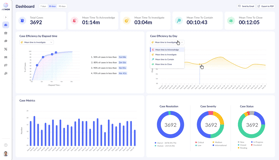
Every finding documented. Coverage, MTTI, and case quality in one dashboard.

Response Guidance

What to do next is not always clear.

See what was reviewed, what was found, and what to do, every time.

Autonomous investigation
Human-controlled response.

Graphic Cropped Two
DARRYL

Investigates

Reviews alert and context to determine what happened and whether it needs attention.
01

Recommends

Explains what looks noisy, risky, or worth escalation, with evidence and a suggested next step.
02
YOU

Respond*

You choose what to ignore, escalate, investigate further, or act on.

03

* Our agent does not take response actions in your environment.

DATA & SECURITY

Clear controls.

Your data stays isolated and encrypted end to end.

Least-privilege access, audit-logged on every action.

Configurable retention. You decide what is kept and where.

Audit-ready by design with SOC 2 controls built-in.

Start free.
Expand when you need more.

Start for Free

AI investigations for up to 100 alerts.

Add More

volume or integrations if needed.

Move to our AI MDR

Managed AI SOC with 24/7 human coverage and escalations when needed.

See what AI-powered investigation can do with your alerts.

Create your free account.
Connect a source.
Run your first investigation.

Questions? Talk to a Human

100 investigations free,
then $4/investigation.

Up and running in 60 minutes
40+ integrations
No sales calls
No credit card

Need more than 100 investigations? We'll help tailor the right path for your environment. Book time with us

FREQUENTLY ASKED

Everything you need to know.

AirMDR FAST is a self-serve way to experience autonomous alert triage.

Connect a source, and Darryl – AirMDR's AI analyst – investigates your alerts: reviewing context, checking connected sources, evaluating evidence, assigning a disposition and confidence score, and recommending next steps. Most investigations complete in minutes. You review the work and decide what to do.

It's designed so you can get value in the first session, without a sales call, a demo, or a lengthy POV.

Darryl investigates security alerts.

For each alert, Darryl reviews alerts and comes up with questions it needs to answer to determine if the alert is really malicious or benign. It then tries to fetch the data needed to answer those questions using the systems it has access to. Once it has gathered the full context, it analyzes the evidence, determines what likely happened, assigns a disposition and confidence score, and recommends what to do next.

No. FAST is not the full AirMDR MDR service.

FAST gives you access to AI-powered alert investigations. AirMDR MDR adds 24/7 monitoring, human analyst oversight, security engineering, managed response workflows, and a fully managed service layer.

FAST is a self-serve AI investigation experience based on the AI SOC platform AirMDR built to power our MDR service.

It gives you a focused way to try agentic alert investigations quickly. It does not include the full platform, full MDR service, 24/7 SOC, or human delivery layer.

FAST is built for hands-on security teams that need help investigating alerts faster.

That includes hands-on CISOs, security and IT directors, security and cloud architects, security analysts, and principal engineers – especially in lean teams where there are more alerts than the team has time to review manually.

FAST includes:

  • 100 free investigations
  • Access to Darryl, AirMDR's AI analyst
  • Self-serve alert investigations
  • Starter integrations
  • Sample alerts
  • Evidence-backed investigation results
  • Follow-up questions through Darryl
  • Email support

FAST does not include:

  • Full AirMDR MDR service
  • 24/7 human SOC monitoring
  • Human analyst validation on every investigation
  • Autonomous remediation
  • SLA-backed support
  • Full AirMDR platform access
  • Custom dashboards
  • Custom detections
  • Managed SIEM
  • Managed response workflows

No. FAST investigations are performed by Darryl (our AI Analyst)

Human analyst oversight, tuning, validation, and accountability are part of AirMDR's paid MDR service.

No. FAST does not automatically remediate threats or take response actions in your environment.

Darryl investigates, explains, and recommends. You decide what action to take.

Sign up, connect an alert source, and let Darryl start investigating.

FAST is designed to move quickly: connect a source, review Darryl's investigation, and decide what to do next.

No. You can start using FAST without a sales call.

No. You can start with 100 free investigations without a credit card.

Most users are up and running in under an hour, and get valuable results in the first session.

Setup time depends on the source you're connecting and whether you have the right API credentials ready. For most supported sources, the connection itself takes a few minutes.

You need:

  • A FAST account
  • Access to a supported alert source
  • Permission to create the required API connection
  • Alert data for Darryl to investigate
  • [Optional] Access to additional sources that provide the context needed for investigation

Yes. FAST includes sample alerts so you can see how Darryl investigates before connecting a live source.

After connecting a source, you can have Darryl fetch one or more alerts and start investigating them. Once an investigation is complete, you review the generated case – including the finding, supporting evidence, confidence score, and recommended next steps.

You can also schedule Darryl to check for new alerts periodically and investigate them automatically, so triage keeps moving without requiring you to kick off each one manually.

Yes. FAST is designed to let you decide which alerts to investigate.

Review the investigation. Look at the evidence. Check the disposition and confidence. Ask Darryl follow-up questions if anything is unclear. Then decide whether to respond, ignore, investigate further, or connect more context.

FAST includes the starter integrations shown on this page and covers common security tools, including EDR, SIEM, cloud, identity, and email security sources.

FAST includes 40+ starter integrations, most of which are shown on this page.

If you need more integrations, higher volume, or custom coverage, AirMDR can help through a paid platform or MDR option.

Yes. AirMDR supports broader integration coverage – over 200 integrations – in its paid offerings.

FAST includes the integrations that cover the most common alert sources and are easy to configure in a self-serve setup.

Yes. FAST uses read-only access to your connected security tools. Darryl reads alert data and related context to investigate alerts, but FAST does not write back to your tools, create tickets in external systems, or take remediation actions. Investigation results are created inside AirMDR.

Permissions vary by integration.

Most connections are API-based and require credentials or an API key with enough access for Darryl to read the alert and related context needed for investigation.

No. FAST does not create tickets or cases in your external systems.

Investigation results are created inside the FAST environment.

You can still explore FAST with sample alerts or connect a supported source.

If you need a specific integration that is not included in FAST, talk to AirMDR about the right paid option.

Usually, yes.

Darryl can investigate with the data available, but more context can improve the quality and confidence of the result.

One investigation is one alert investigated by Darryl.

Darryl pulls in the alert, reviews available context, checks connected sources, reaches a disposition, assigns confidence, and recommends next steps.

No. Asking Darryl follow-up questions about an existing investigation does not count as a new investigation.

Yes. If you ask Darryl to reinvestigate or rerun an alert, that counts as a new investigation.

A Darryl investigation may include:

  • Executive summary
  • What happened
  • Timeline
  • IOCs
  • Disposition
  • Confidence score
  • Evidence reviewed
  • Sources checked
  • Recommended actions and next steps

No. Darryl investigates – pulling context from connected sources, evaluating what the evidence actually means, determining whether the activity is a real threat or noise, and explaining the reasoning behind the conclusion. The goal is a defensible disposition, not a reformatted alert.

Most investigations complete in minutes: 95% of alerts are investigated in under 5 minutes.

Timing depends on the alert, the data available, the connected sources, and the depth of investigation required.

The confidence score reflects Darryl's judgment about how well-supported the conclusion is, based on the evidence available.

A higher score means Darryl had stronger, more definitive data to work with. A lower score means the investigation may be missing context, or the available data was ambiguous. The score is Darryl's own assessment – not a formalized checklist or equation – and should be one input in your review, not the only one.

Darryl will still provide the best investigation it can, but the confidence may be lower.

When context is missing, Darryl will identify what data was unavailable, what assumptions it made, and what additional information would help improve the investigation.

Yes. You can ask Darryl follow-up questions about the investigation.

For example:

Yes. You can give Darryl feedback and add context about your environment.

For example, if an activity is normal for a specific team, user, application, or workflow, you can tell Darryl so future investigations have better context.

Yes. Darryl remembers facts you provide and can use them in future investigations.

Yes. Darryl is an AI analyst, and its conclusions should be reviewed before you act on them.

FAST is designed to make Darryl's work inspectable. You can see the evidence it used, the sources it checked, the assumptions it made, and where data was missing. If something doesn't look right, you can ask follow-up questions, add context, or ask for a reinvestigation. The goal is an investigation you can verify, not one you have to take on faith.

No. Darryl helps investigate alerts faster and at greater scale, but humans still make the final decision on response. Humans get to supervise Darryl, and provide valuable feedback which Darryl can use to investigate differently.

In FAST, you review Darryl's work and decide what to do next. In our MDR, AirMDR's human analysts provide the managed validation and accountability layer.

FAST accesses the alert data and related context needed to investigate alerts from the sources you connect.

Yes. FAST is read-only.

Darryl reads from connected tools to investigate alerts. It does not take response actions or make changes in your environment.

Alert data and investigation outputs are retained for 30 days.

No. AirMDR does not use your alert data to train models.

Yes. You can disconnect connected sources at any time.

Yes. You can delete your data.

Yes. AirMDR's privacy policy applies to FAST.

Data Processing Agreements are available for enterprise customers.

No. FAST does not take remediation or response actions in your environment.

Darryl investigates and recommends. You control the response.

No. FAST does not include an SLA.

SLA-backed service is available through paid AirMDR offerings.

You get 100 free investigations.

Your investigations don't expire as long as your account remains active. If your account has no activity for 30 days, it may be deactivated. Investigation outputs are retained for 30 days.

You can still view your previous investigations, but you cannot run new investigations until you add more capacity or upgrade.

Additional investigations are $4 per investigation.

Yes. You can add more investigation capacity when you need it.

AirMDR can tailor a higher-volume option for your environment.

AirMDR can support broader integration needs, generally through paid platform and MDR options.

No. One FAST account is for one user.

Team use is available through paid AirMDR options.

If multiple people need shared access, shared investigations, more integrations, or pooled capacity, AirMDR can help you choose the right plan.

You can move from FAST to a paid AirMDR option when you need more capacity, more integrations, managed tuning, human support, or 24/7 MDR.

FAST gives you self-serve AI investigations.

The AirMDR platform gives you broader capabilities, higher volume, more integrations, and more configuration.

AirMDR MDR gives you the full managed service: 24/7 SOC, human analyst oversight, managed SIEM, custom detections, security engineering, and managed response workflows.

Upgrade when you need:

  • SLA-backed service
  • More than 100 investigations
  • More integrations
  • Multiple users
  • Team workflows
  • Higher alert volume
  • Managed tuning
  • Human analyst support
  • 24/7 monitoring
  • Managed response workflows

FAST includes email support.

You can contact AirMDR at fast@airmdr.com.

Yes. You can ask Darryl questions inside the product.

Live support is not included as a standard part of FAST.

For guided onboarding, managed tuning, or direct analyst support, AirMDR can help through a paid option.

Ask Darryl follow-up questions.

You can ask what evidence it used, what it assumed, what data was missing, and why it reached the conclusion. You can also provide additional context and ask Darryl to update or reinvestigate.

Tell Darryl what it needs to know.

You can add facts about your environment so Darryl can use that context in future investigations.

Not as part of the standard FAST experience.

AirMDR analyst support is part of paid AI-powered MDR, where AirMDR's team helps validate, tune, and manage investigations for you.

No. FAST does not include SLA-backed support.

You can contact fast@airmdr.com.

If your setup requires custom integration work, guided onboarding, or managed configuration, AirMDR can help through a paid option.

Still have questions? Talk to a Human

Let's Connect.

Have questions or want to learn more? We're happy to help however we can.